
Content Outline
Processing Speech Elimination Rounds
Review Ballots (Tab Team)
- Select the round from the left navigation.
- Results will appear under the Ballots tab.
- Once all judges in a given room have submitted their ballots, the gray toggle for that room will slightly darken.
- Click on a room with submitted ballots to review that room’s results.
- First confirm that all final ranks from a given judge are unique (i.e., there are no duplicates). Acceptable exceptions to this may occur if there are multiple DNCs in the same room.
- Check for ties under TOTAL VALUE.
- If there are any ties in total value, confirm that those ties have been broken correctly according to the Qualification System (p. 23) (Note that these are somewhat different from preliminary tie-breaks.):
- Judges’ Preference. The competitor who receives the better [final] ranking from the greatest number of judges will be ranked higher.
- Preliminary Ranking.
- Once tie breaks have been verified, click on the blue JUDGE RANKS heading to verify rank values and check for penalties.
- Confirm that the correct rank values have been applied for the size of the room according to the Qualification System (p. 19).
- Confirm that penalties have been re-ranked appropriately and the correct final ranks and rank values have been assigned.
Abbreviations and values for judge-applied penalties:
- OT: overtime (2-rank penalty)
- TMR: timer issue (2-rank penalty)
- SCR: script usage (4-rank penalty)
- DNC: did not compete (given 1 rank and value lower than bottom of the room)
- The Tab Lead should report any unexpected DNC penalties to the TD/RC immediately.
- Once the ballot has been reviewed and found to be correct, the Tab Team Member should click the toggle to approve the room. (Should something on the ballot appear to be incorrect, the room should remain unapproved and the Tab Lead should contact Tab Support. Be sure to include the tournament name, round, event, and room number.)
Report Any Inconsistent DNC Application
A judge-applied penalty will only appear if 2 or more judges agreed on the penalty. However, DNCs are initially ranked to 99, so a single judge noting a DNC should be flagged in red, but the “DNC” penalty will not appear:
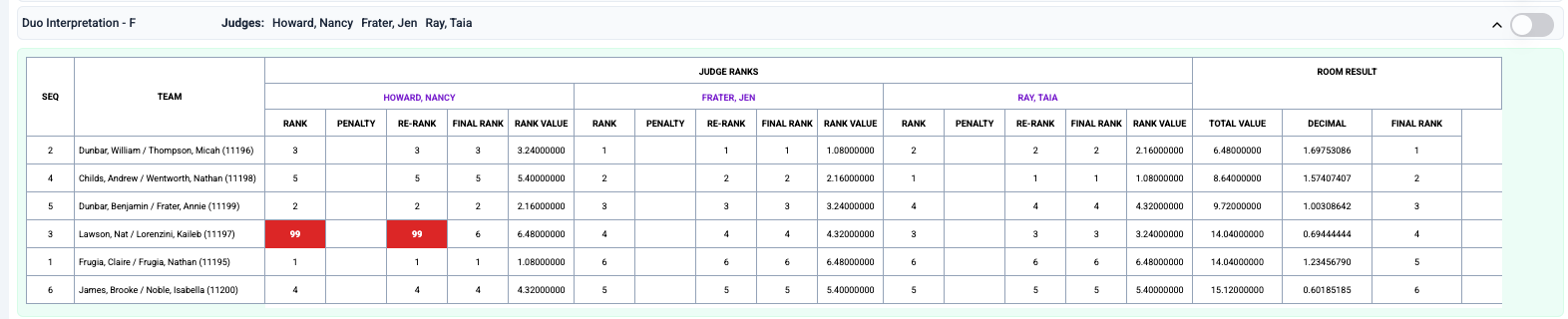
The Tab Lead should report any inconsistency in DNC application by the judges (such as the above example) to the TD/RC immediately.
Requesting Clearance from Compliance (Tab Lead)
- Once all speech ballots are in and all round penalties have been applied and reviewed, the Tab Lead should ask the Compliance Lead if speech is clear to proceed to the next elimination round (or Awards following the Final Round).
- If Compliance applies a penalty, the Tab Lead must process and review that penalty before approving the round.
- The Tab Lead must receive clearance from Compliance before approving any speech elimination round.
Review & Approve the Elimination Round
- Once all ballots have been reviewed and verified by the Tab Team and clearance has been given by the Compliance Lead, the Tab Lead may Approve Round.
- If you just approved the Final Round of speech, proceed to the lesson on Finalizing Debate & Speech.
- If moving on to another elimination round:
- Approving the round will schedule the next elimination round, generate ballots, and assign limited prep topics.
Prepare Announcement Sheets
- Select Reports, followed by Announcement Sheet.
- Verify that competitors on the break announcement sheet are the ones ranked in the top half of each room from the previous elimination round and that no disqualified competitors are listed.
- For in-person tournaments:
- Print a copy for the TD/RC and place in a folder or manilla envelope.
- For online tournaments:
- Save as PDF and share electronically according to the TD/RC’s preferences.
Review Schedule and Topics (Tab Lead & Team Members)
- Check the schedule by selecting Scheduler.
- Click on each set of initials with any number greater than 1 in parentheses to view that student’s schedule.
- Confirm that each competitor:
- Has no direct conflicts (more than one speech in the same speaking slot)
- Has at least 2 empty speaking slots before an Extemporaneous speech (or 1 empty slot prior to first speaker in the room)
- Ideally, has no back-to-back speeches. A single back-to-back with rooms relatively close together is not a problem. However, if there is a great distance between rooms, or if there are 3 or more speeches back-to-back, it is best to improve that competitor’s schedule if possible.
- Contact your Tab Support POC if a change in the schedule needs to be made.
- If needed and directed by the TD/RC or Tab Support, the scheduler can be run again by selecting Re-Schedule Round.
- Check limited prep topic cards by selecting Reports.
-
- Select [Event] Cards to view the topics assigned.
- Read carefully through the cards to confirm that:
- Cards have loaded correctly with 2 topic options per competitor
- There are no misspellings or significant (i.e., affects readability or comprehension) grammatical errors
- There are no repeat topics within the same room
- Report any problems with topic cards to your Tab Support POC immediately.
Review & Release Ballots (Tab Lead)
- Once the schedule, break announcements, and limited prep topics have been reviewed and no problems have been found (or remain) select Ballots to review (confirming the correct number of judges are needed) and then Release Ballots to Staff 1–1.5 hours before the round is scheduled to begin to allow the Ballot Admin Team to control ballot release.
Prepare Deliverables for In-Person Tournaments (Tab Lead & Team Members)
- Once the schedule and limited prep topics have been reviewed and no problems have been found (or remain), prepare deliverables by selecting Reports.
- Print the following reports:
- Door Postings for each event (1 per room)
- Wall Postings for each event (quantity TBD by TD/RC or Communications Lead)
- Limited Prep Topic Cards (1 per room printed on Avery 5390)
- Prepare reports for Communications team:
- Wall Postings
- Create sets of Wall Postings by stacking 1 of each event’s Wall Postings in alphabetical order.
- Cross-hatch each full set of Wall Postings.
- Combine Door Postings with Limited Prep Cards (except Extemp Cards).
- Door postings should be organized by building and/or floor (if applicable) and placed in numerical order of rooms.
- For Door Postings of Apologetics and Impromptu, paperclip together in this order for each room:
- Door Posting
- Topic cards for that room (with outside perforated borders removed)
- Place organized Door Postings (with attached Limited Prep deliverables as applicable) into manilla envelopes by building, floor, or whatever the Communications Lead has requested, labeling envelopes accordingly. Using post-its to label can be helpful for recycling envelopes.
- Place the prepared manilla folders and Wall Posting sets (face down) aside for the Communications Lead no later than 30 minutes prior to the scheduled start of the round.
- If needed, remind the Communications Lead to return manilla envelopes and paper clips for the next round.
- Wall Postings
- Prepare Extemp folder for Extemp Prep Lead.
- The folder should include:
- Extemp topic cards for all rooms (with outside perforated borders removed)
- 3 Extemp Wall Postings (For large tournaments with additional Extemp Prep Team Members, the Extemp Prep Lead may request additional Wall Postings.)
- Place the prepared Extemp folder aside for the Extemp Prep Lead no later than 30 minutes prior to the scheduled start of the round.
- The folder should include:
Prepare Speaker Times Report for In-Person Tournaments (Tab Lead & Team Members)
- Once the round start time has been set by the Ballot Admin team, the Tab Lead should print the Speaker Times report immediately.
- Under Report, select Speaker Times Report.
- Confirm that the report reflects the correct scheduled start time and print the same number as was requested for that round’s Wall Postings (including Wall Postings in the Extemp Prep folder if applicable).
- The Extemp page does not need to be printed in rounds in which Extemp does not take place.
- Deliver all printed Speaker Times reports (for Communications and Extemp Prep if applicable) to the Communications Lead.
Ranking Competitors Ending Competition in SemiFinals (or QuarterFinals at the National Championship) (Tab Lead & Team Members)
- When convenient, the Tab Team should determine the final ranks for competitors who were eliminated in the SemiFinal Round (and QuarterFinal Round, if applicable).
- Final standings for SemiFinalists are determined by the following process:
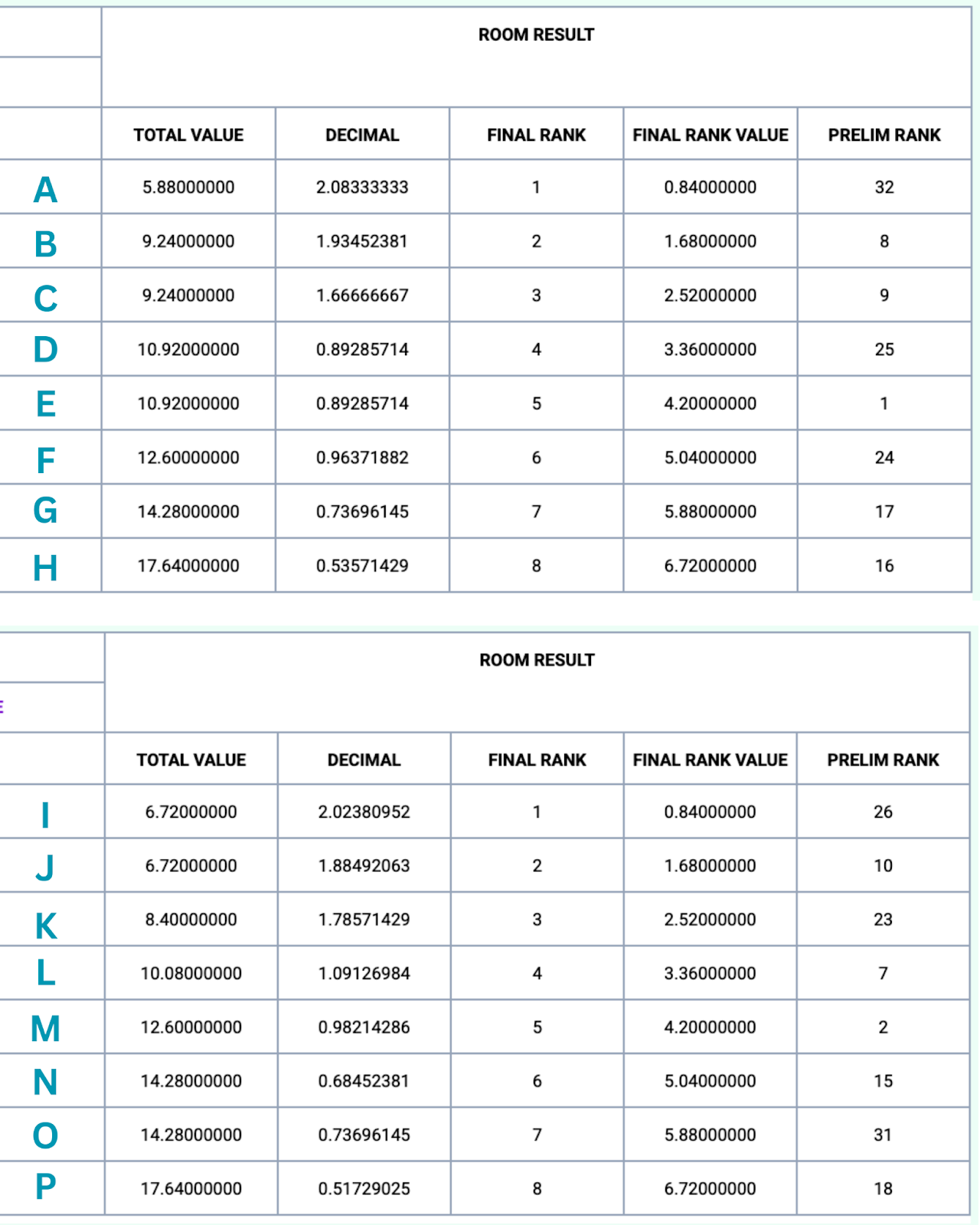
- SemiFinalists are ordered by room rank. A SemiFinal round has two of each rank (two 5th places, two 6th places, etc.), one from each room. (For modified SemiFinals, there will be four of each rank.) The preliminary ranking is used to break the tie between those of the same room ranks. The competitor with the better preliminary rank receives the better final ranking.
- In the following example, competitors A-D and I-L would advance to the final round. The remaining competitors would be ranked:
- 9th: E
- 10th: M
- 11th: N
- 12th: F
- 13th: G
- 14th: O
- 15th: H
- 16th: P
Verifying All Around Awards (Tab Lead & Team Members)
- When convenient, the Tab Team should verify All Around Award recipients. See page 26 of the Qualification System.
What should I look for when processing Speech Elim rounds?
Check for anything that may need to be reported, is out of the ordinary, or seems unreasonable.
This may include, but is not limited to the following:
- Confirm that a judge’s final ranks are each unique
- Check tie breaks of Total Value
- Confirm that the correct rank values have been applied for the size of the room
- Confirm that penalties have been re-ranked appropriately and the correct final ranks and rank values have been assigned
- Unexpected or inconsistent DNC penalties need to be reported to the TD/RC immediately
- Receive clearance from the Compliance Lead before you Approve Round.
- Verify that the speakers on the announcement sheet include all students advancing and none who are not advancing.
- Check the scheduler for no direct conflicts, sufficient time for Extemp prep, and no far or excessive back-to-backs.
- Review limited prep topics for potential errors or repeat topics within a room.
- Confirm the correct number of judges are needed on ballots.
- Be sure to release ballots to the Ballot Admin team on time (at least 1 hour prior to the scheduled start of the round).
- Verify and prepare Announcement Sheets for the TD/RC.