
Content Outline
Approving Preliminary Speech Rounds
Review Ballots (Tab Team)
- Select the round from the left navigation.
- Results will appear under the Ballots tab.
- Once all judges in a given room have submitted their ballots, the gray toggle for that room will slightly darken.
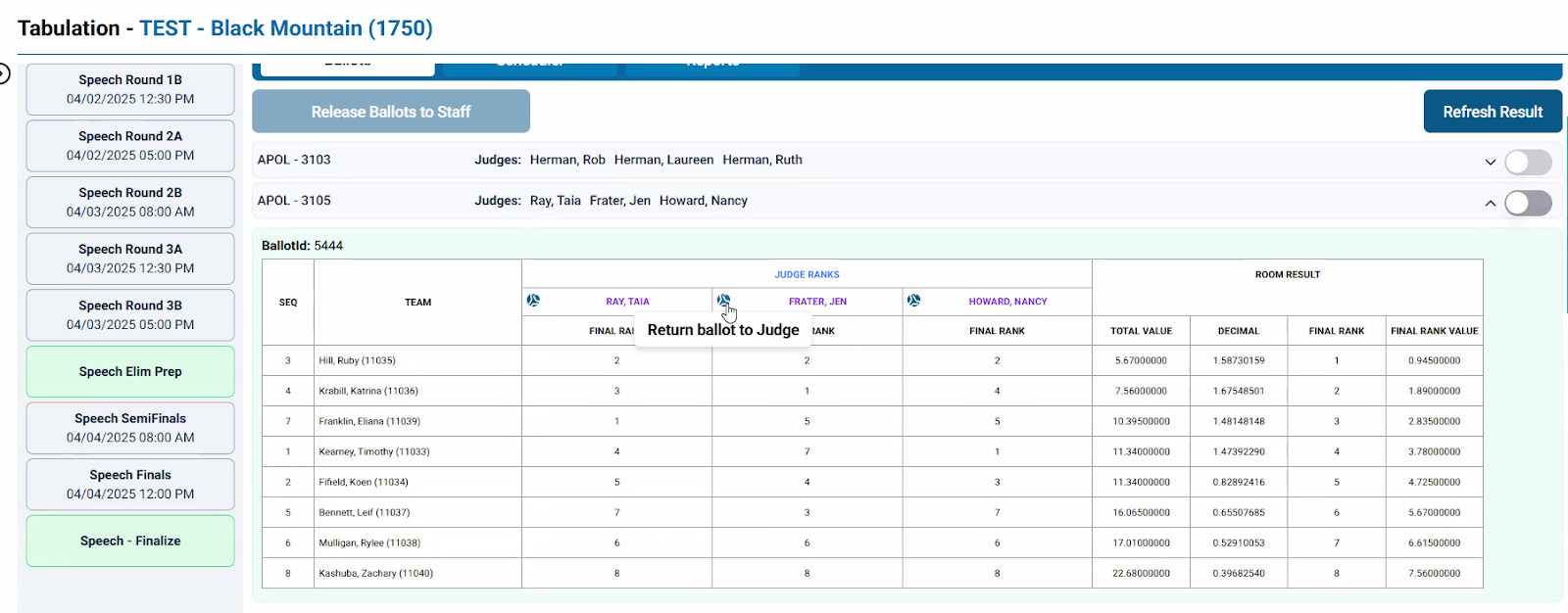
- Click on a room with submitted ballots to review that room’s results:
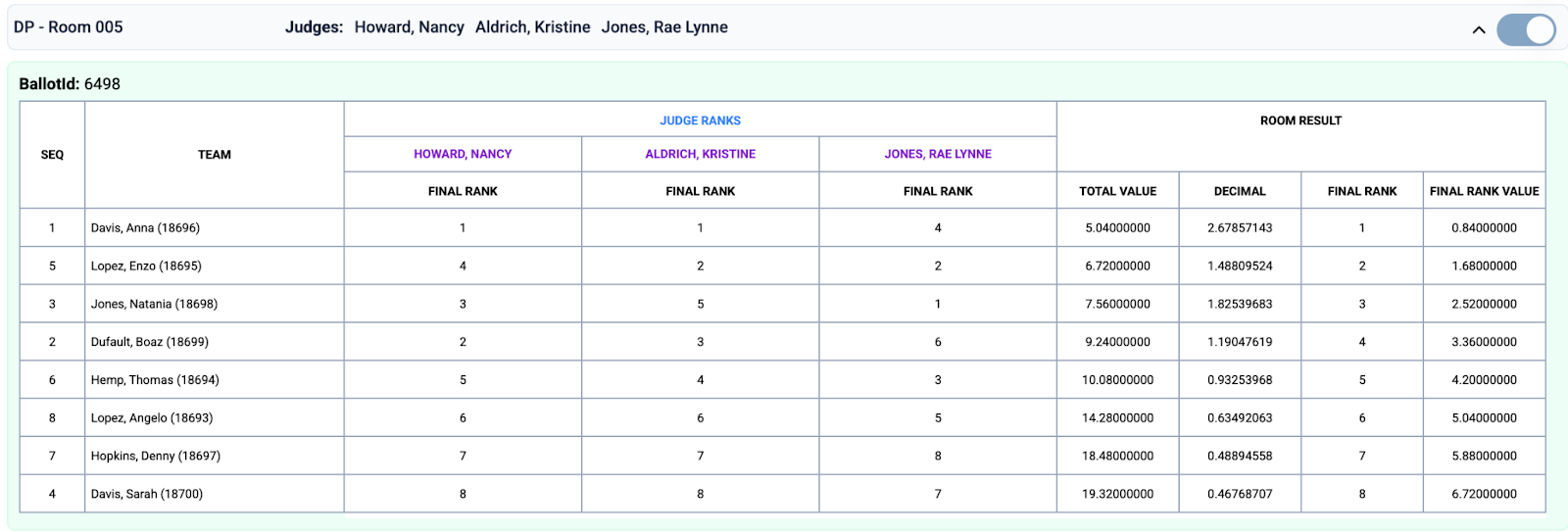
- First confirm that all final ranks from a given judge are unique (i.e., there are no duplicates). Acceptable exceptions to this may occur if there are multiple DNCs in the same room.
- Check for ties under TOTAL VALUE. (In the example above, the 4th & 5th ranked competitors have a tie in total value.)
- If there are any ties in total value, confirm that those ties have been broken correctly according to the Qualification System (p. 20):
- Judges’ Preference. The competitor who receives the better final ranking from the greatest number of judges will be ranked higher.
- Decimal Conversion. The competitor who has the higher decimal conversion receives the better rank. Decimal conversion is determined by dividing 1 by each of the three judges' rank values and adding those three decimals together. Should the decimal conversion break some but not all ties, rank those you can with decimal conversion and restart the tie-breaking process using Judges' Preference with those competitors who remain tied.
- Middle Rank. If the tie cannot be broken, all three students receive the same middle rank.
- Once tie breaks have been verified, click on the blue JUDGE RANKS heading to verify rank values and check for penalties:
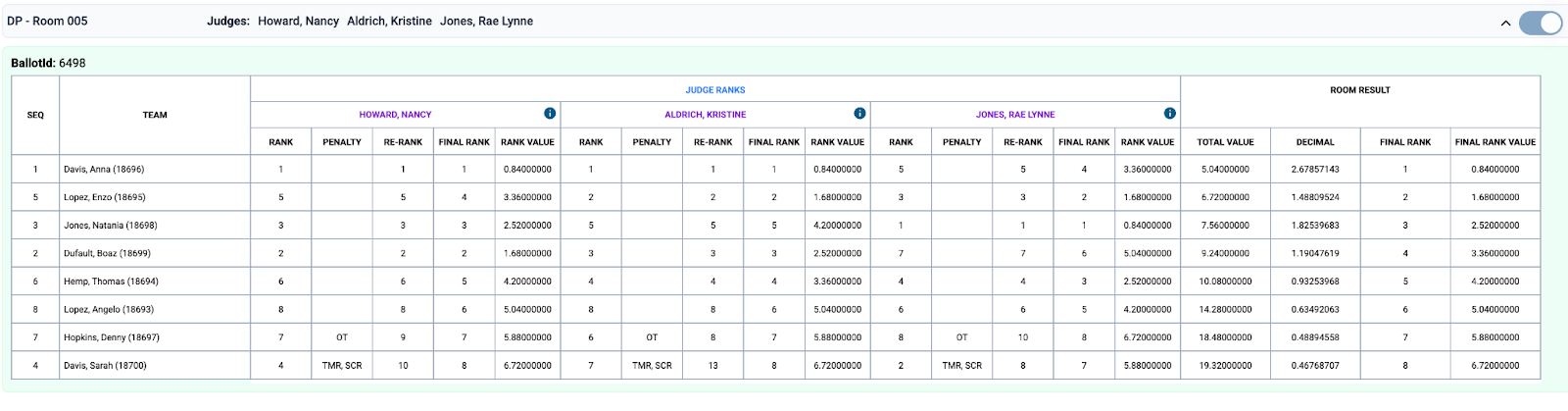
- Confirm that the correct rank values have been applied for the size of the room according to the Qualification System (p. 19).
- Confirm that penalties have been re-ranked appropriately and the correct final ranks and rank values have been assigned.
Abbreviations and values for judge-applied penalties:
- OT: overtime (2-rank penalty)
- TMR: timer issue (2-rank penalty)
- SCR: script usage (4-rank penalty)
- DNC: did not compete (given 1 rank and value lower than bottom of the room)
- The Tab Lead should report any unexpected DNC penalties to the TD/RC immediately. (Once the TD/RC has followed up with the student and parent, the Tab Lead should follow up to determine whether the student will be continuing in competition or needs to be dropped.)
- Once the ballot has been reviewed and found to be correct, the Tab Team Member should click the toggle to approve the room. (Should something on the ballot appear to be incorrect, the room should remain unapproved and the Tab Lead should contact Tab Support. Be sure to include the tournament name, round, event, and room number.)
Report Any Inconsistent DNC Application
A judge-applied penalty will only appear if 2 or more judges agreed on the penalty. However, DNCs are initially ranked to 99, so a single judge noting a DNC should be flagged in red, but the “DNC” penalty will not appear:
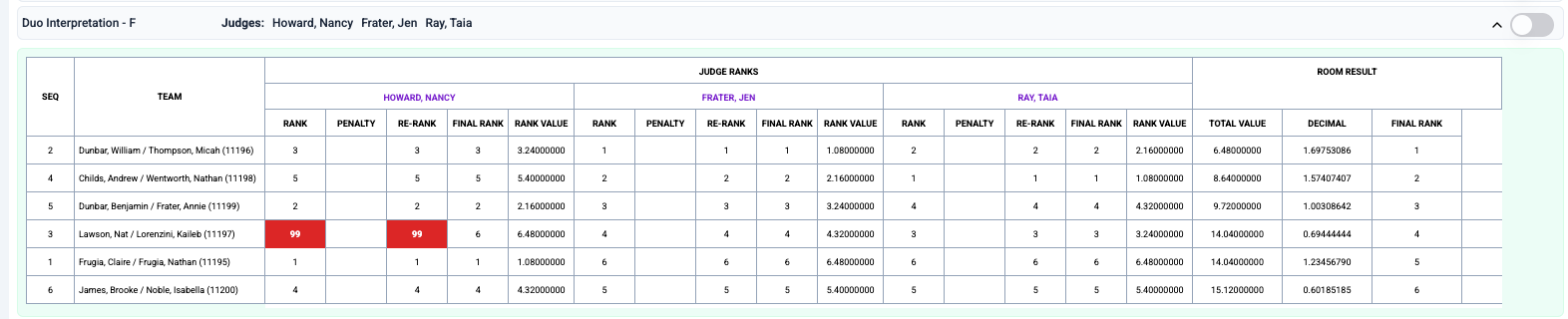
The Tab Lead should report any inconsistency in DNC application by the judges (such as the above example) to the TD/RC immediately.
Review & Approve the Round (Tab Lead)
- Once all of a round’s ballots have been reviewed by the whole team and approved, the Tab Lead should select Approve Round.
Who should click/toggle what?
- It is best practice to have one person do the toggling for all ballots in a speech round to avoid confusion.
- Typically, a Tab Team Member will toggle ballots, and the Tab Lead will approve and generate rounds and apply penalties.
- If needed or requested by the TD/RC or Compliance Lead, the Tab Lead may access a student’s ballot by clicking on the information symbol in the top right corner of the tabulation ballot results for an individual judge:
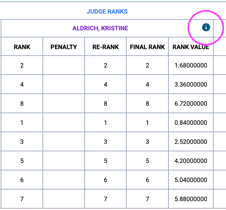
- To share with the Compliance Lead, the Tab Lead should Save as PDF and upload the file(s) in thread responding to the ballot request.
- If the ballot is longer than one page, you may need to take screenshots to capture all feedback.
Returning a Ballot to a Judge (Tab Lead)
A ballot should only be returned to a judge if the Tab Lead has been instructed to do so by the TD/RC or National Tab Support.
To return a ballot to a judge:
- If round is approved, unapprove round.
- If ballot is approved, unapprove ballot.
- Select the soccer ball icon to the left of a judge’s name to return the ballot to that judge.
Compliance Adjustments (Tab Lead)
- Compliance adjustments may include applying a penalty or removing a penalty. Possible penalties include:
- Any of the judge-applied penalties mentioned above
- C+4 (a 4-rank penalty)
- C+8 (an 8-rank penalty)
- DQ (Disqualification: should rank below bottom of the room, like a DNC. Not eligible to continue competing or to be recognized in awards.)
- Speech prelim penalties can be applied at any time during the preliminary rounds, after the ballot has been submitted. All prelim penalties must be applied before approving preliminary rankings.
- Select Speech Penalties from the left navigation.
- Apply Penalties:
- Review each penalty and click Apply.
- The penalty will be applied, and the competitors in the room will be re-ranked accordingly.
- Verify Penalties:
- Re-review the results for each room in which a penalty was applied.
- Approve the results for the room when you’ve confirmed the penalty application and room re-rankings are correct.
What should I look for when reviewing a speech round?
Check for anything that may need to be reported, is out of the ordinary, or seems unreasonable.
This may include, but is not limited to the following:
- Confirm that a judge’s final ranks are each unique
- Check tie breaks of Total Value
- Confirm that the correct rank values have been applied for the size of the room
- Confirm that penalties have been re-ranked appropriately and the correct final ranks and rank values have been assigned
- Unexpected or inconsistent DNC penalties need to be reported to the TD/RC immediately